Setup and progression
Azeroth Survivors Steam Deck & controller: controls and launch setup
The original game has a controller settings menu. Steam Deck installation steps below come from a player report, separate from our direct menu observations.
On this page
Controller bindings in the original menuDeadzone, camera and zoomSteam Deck setup reported by mo7233Compatibility and limitationsSources & scopeController bindings in the original menu
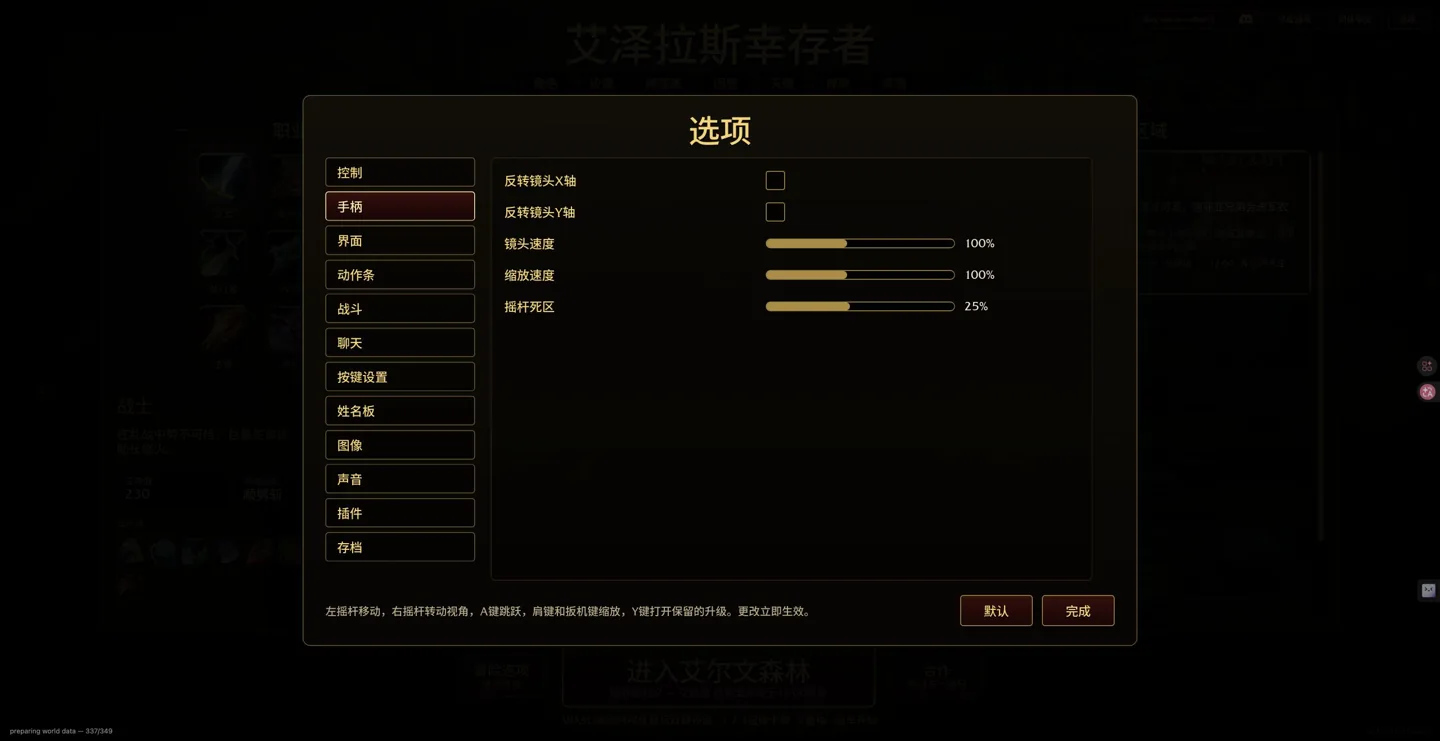
| Input | Action shown in the menu |
|---|---|
| Left stick | Move |
| Right stick | Rotate the view |
| A | Jump |
| Shoulders / triggers | Zoom |
| Y | Open banked upgrades |
Deadzone, camera and zoom
The menu offers X/Y camera inversion, camera speed, zoom speed and stick deadzone; changes take effect immediately. Our browser showed 100% camera speed, 100% zoom and 25% deadzone. These are observed values, not universal optimal settings. If a stick drifts, increase its deadzone gradually and check whether small deliberate movements still work.
Steam Deck setup reported by mo7233
These are community-reported steps, not our physical-device test or a Valve compatibility certification.
- In Desktop Mode, download and fully extract the creator’s Windows archive, keeping the EXE and Data together.
- In Steam choose Games → Add a Non-Steam Game → Browse and select AzerothSurvivors.exe.
- Set Start In in Properties to the executable folder.
- Select Proton Experimental under Compatibility.
- The player reports fixing an initial crash with the launch option below; consult the report if you encounter that issue.
- Return to Gaming Mode and open the non-Steam shortcut.
WGPU_BACKEND=vulkan %command%The later discussion removes PROTON_LOG=1; it is unnecessary for routine play and can create large log files.
Compatibility and limitations
Original menus checked October 25, 2026: v0.115.0 (6d1c4473). Menu observations and community reports are labelled separately. These notes do not import rules from WoW add-ons, community rebuilds or older videos.
A native controller menu does not prove support for every device. We have not tested physical controllers, Steam Deck frame rate, battery life, suspend/resume or a native Linux package, and do not invent unlisted card-selection buttons.
FAQ
Is the Vulkan option mandatory on Steam Deck?
It is a workaround reported after one player’s initial crash, not a universal requirement. Check extraction and Start In first, then consult the original thread.
Sources & scope
Independent guide. Not affiliated with Aethus or Blizzard Entertainment.